Social Icons

Pages

Featured Posts

Thursday, February 10, 2011

BlackBerry Roadmap 2011 Leaked!

CDMA BlackBerry Roadmap 2011
Keep in mind - this is CDMA (hence why you're not seeing Torch2 or apollo listed). Also means
we could see GSM releases sooner than the CDMA timeline above... plus things often change from plan.
In the last couple of weeks we've learned a lot about RIM's 2011 BlackBerry pipeline thanks to a handful of device leaks. After months (and in some cases over a year) of speculation, we saw specs and renderings show up for the dakota (touchscreen GSM Bold), monaco (aka Storm 3, though possibly will not fall under Storm branding at launch), Torch 2 and apollo (new curve). All that was followed by rumors of another Curve, sedona. Despite the windfall, what we've been looking at only told about 65% of the story. Today, thanks to a whack load of CDMA carrier roadmap slides, we can further fill in the gaps and clarify the codenames and even product names of what's coming up in 2011, including an entirely new device that really hasn't been touched on yet (Curve Touch!).
Further BlackBerry Smartphone Roadmap Highlights and Clarifications
  • new BlackBerry Bold Touch: dakota is the GSM version, while montana is the CDMA version
  • next gen Curve: apollo is the GSM version, while sedona is the CDMA version
  • new Curve Touch: not previously mentioned, malibu is a new CDMA touchscreen Curve (likely to be a GSM one in the works too of course)
On the BlackBerry 6.1 front, beyond what we learned at DevCon Asia, we can see some of the other goodies coming our way. Included in the update is a faster user experience via "liquid graphics", a faster web browser experience (thanks to hardware acceleration and more mhz in the new devices), more homescreen customization options and even voice-activated universal search. 
All in all, things are really starting to make sense and look good! There's plenty to look at below, so keep reading and be sure to sound off in the comments with your thoughts!
 

2011 CDMA BlackBerry Roadmap and BlackBerry 6.1 Evolution

CDMA BlackBerry Roadmap 2011
 
CDMA BlackBerry Roadmap 2011
 
CDMA BlackBerry Roadmap 2011
 
CDMA BlackBerry Roadmap 2011
 
CDMA BlackBerry Roadmap 2011
 
CDMA BlackBerry Roadmap 2011
 
CDMA BlackBerry Roadmap 2011
 
CDMA BlackBerry Roadmap 2011
 
CDMA BlackBerry Roadmap 2011
 
CDMA BlackBerry Roadmap 2011
 
CDMA BlackBerry Roadmap 2011
 
CDMA BlackBerry Roadmap 2011
 
CDMA BlackBerry Roadmap 2011
 
CDMA BlackBerry Roadmap 2011
 
CDMA BlackBerry Roadmap 2011
 
CDMA BlackBerry Roadmap 2011
 
CDMA BlackBerry Roadmap 2011
 
CDMA BlackBerry Roadmap 2011

source: crackberry

New BlackBerry Curve Touch Image and Specs leaked!

BlackBerry Curve Touch
While the BlackBerry apollo and sedona are looking to be the next update to the entry level BlackBerry Curve line in a non-touchscreen format, following those devices a touchscreen variant is on the way. Pictured above is the BlackBerry codenamed malibu, the CDMA flavor of what will likely go to market as the BlackBerry Curve Touch, which is slated to be released in late 2011/early 2012 as the first Curve to lack a keyboard. Proposed Specs include:
  • Processor: Qualcomm MSM 8655 800MHz CPU
  • Radio: CDMA - EvDo Rev A
  • Display: 3.25" 480x360 HVGA
  • Navigation: Trackpad & Nav Keys
  • Keypad: Virtual QWERTY
  • Camera: 5 MP (with HD Video recording)
  • Memory: 1GB Flash + 512MB RAM, Hot Swap MicroSD slot
  • Wi-Fi 802.11 b/g/n
  • GPS: Autonomous & A-GPS
  • Connectivity: NFC, Micro USB, Bluetooth 2.1
  • Sensors: Ambient Light Sensor, accelerometer
While the malibu is the CDMA Curve Touch, it only makes sense that a GSM version is in the works too. Looking like a sweet entry level BlackBerry!

source: crackberry

Friday, January 7, 2011

UberSocial - Free Twitter App with Cool Features for iPhone & iPod Touch

UberSocial on iPhone 4
Just when we thought Twitter apps for iOS platform reached a saturation level with no more feature expectations, yet another iPhone app is here. The all new UberSocial Twitter app for iOS has been released.
UberSocial is free Twitter client which is both feature rich and refreshing. With UberSocial you just need to slide down to tweet. The app lets you navigate through easily with a menu button that displays all Twitter features in a single vertical row. On the right side you will see a compose button which when clicked slides down with cool sliding effect. Updating your timeline and scrolling up or down can’t get more easier. Unlike official Twitter iPhone app which require you to scroll up for refreshing timeline in UberSocial you press a refresh button top to refresh. Also to navigate to top and bottom most tweets you can hit the two buttons placed on both sides of the refresh button.
UberSocial Nav buttons
The UberSocial app for iPhone also includes features like Filters, Lists, Trends etc with each feature having a unique style and elegance. Easy navigation with better use of screen space is what defines UberSocial. Too good to be free. Note that this app will work only on iPhone or iPod Touch running iOS 4.0 onwards.
UberSocial Top Tweets
UberSocial iPhone

Watch the video of UberSocial for iPhone and iPod Touch:

Download UberSocial for iPhone and iPod Touch for FREE

Angry Birds for Windows Available Now Via Intel AppUp Center

Angry Birds
Good news for all Angry Birds game fans. The game which was available only for iOS and Android platform has been ported to Windows platform. Yes, you can attack the dirty pigs right from your computer now. The game comes with a price tag of $9.99 to download in the Intel AppUp center. The Intel AppUp center software works only on  Windows 7 and XP operating systems.
The Angry Birds game for Windows PC from Rovio includes 195 levels of gameplay. Rovio promises to give free updates and certain exclusive features for Windows edition which won’t be available for Android and iPhone users.
As a limited time offer they are providing Angry Birds for a special promotional price of $4.99 in the Intel AppUp center.
Angry Birds Windows 7

Mac App Store hands-on

You may have heard that admist the craziness of CES, Apple decided to launch its Mac App Store on this fine January morning. We've gone ahead and updated our machines to 10.6.6, so we're officially App Store ready. Read on past the break for a walkthrough of the basics, as well as a smattering of some early apps featured front and center.

The first thing you notice upon launching the Mac App Store is the striking resemblance it bears to the iPad App Store. This, of course, shouldn't come as a surprise considering what we've been shown of the next iteration of Apple's desktop OS, Lion. It seems Apple has chosen to take many design cues from iOS "back to the Mac" indeed.


The only obvious difference we see at first glance is the omission of the "Genius" feature from the Mac App Store, which has been replaced with a "Purchases" button. In due time, we're sure Apple will port this feature over, though we're not sure why it's not present at the moment. Still, even the icons used for the respective screens are identical, and aside from a change in the orientation of top charts, the two app stores are still pretty damn similar.

Upon downloading your first Mac App, you'll be prompted to accept some new terms and conditions (which we totally took the time to read through with a fine toothed comb), and then you're off to the races. Unsurprisingly, Apple's own apps are currently dominating the top paid app charts -- for the moment at least -- but the venerable Angry Birds holds the top spot.

Like on the iPad (and iPhone for that matter) app store, each app page is a standardized, simple affair with a brief description, some screenshots, and customer ratings. Since the store just launched this morning, there aren't a ton of customer reviews just yet, but we expect that'll change in due time (read: quickly).

When you actually buy an app, the icon sort of jumps down into your dock, where it starts downloading with a little status bar beneath. This animation feels very iOS-esque (iOSque?), and could certainly be an indication of things to come when Lion arrives in Summer '11. You can also track download status under the Purchases tab, where you can see how large the app is as well. Apps are downloaded to your Mac's Applications folder, and it doesn't look like there's any way to change that default (for now at least).

As far as downloading apps, that's pretty much all there is to it. It's clear that this process is meant to be as simple and streamlined as possible just like the iOS counterparts. We'll be updating this post with more apps as we check 'em out, but if you've got any you would -- or wouldn't -- recommend don't hesitate to sound off in the comments.

App highlights


Angry Birds ($4.99 introductory price): It's the same Angry Birds you know and lose countless hours of productivity because of. The multitouch trackpad is a surprisingly good controller, but it still doesn't match direct input like on your iPhone or iPad. Also, the app uses a mouse-like input for selecting options and then switches back to direct touch control for actual gameplay, so switching between those modes can take a little getting used to.

Twitter (Free): If you're at all familiar with Tweetie for Mac, you'll feel right at home with Twitter for Mac, an app we actually knew would end up launching on the Mac App Store. It's got support for native retweeting, multiple accounts, and Growl notifications, so if you've been in the market for a new Twitter client and #newtwitter just isn't cutting it, be sure to give this a download.

Saturday, November 27, 2010

Motorola Defy coming to Philippine retail stores this December

main.jpg
One of the biggest frustrations we have is Motorola not having presence in the Philippines. Oh, well. At least the Motorola Defy is still coming to town. And when we say "town," we're not talking about the Greenhills that we know, mind you. We mean major retail stores. Yep, our source says that this tough Android handset will make itself comfy on local store shelves this December, the second week being the soonest, with the asking price of P23,000 more or less.
For those who are unfamiliar with the Motorola Defy, it comes with Android 2.1 Eclair (upgradable to Froyo) with Motoblur UI, a 3.7-inch capacitive touch screen, a 5-megapixel camera with auto-focus and LED flash as well full wireless connectivity options. A TI OMAP3610 800MHz CPU partnered with 512MB RAM run the device's show.
For all its bells and whistles, the one thing that separates the Defy from most other Androids is its courage to go through the bumps and grinds, literally. This tank of a mobile phone is stamped with the "proof" tag (read: scratch-proof, dustproof, and waterproof). The good thing is it still maintains a pretty good-looking, albeit usual, facade, given that it's one rugged phone.
We're excited about the Defy because tech sites heaved praises on this tough little cookie. Engadget was particularly amused by its speedy and seamless operation, good battery life, and looks. CNET was impressed by its call quality and slew of multimedia features even though it's a mid-level offering. MobileCrunch liked its lightweight frame and good looks as well as its ability to survive even when submerged in up to 3 meters of water. Ah, what's not to get excited about?

Motorola Defy specs
  • Network
    • 2G: Quadband GSM
    • 3G: HSDPA 900/2100
  • Processor: TI OMAP3610 800MHz processor
  • Screen
    • Type: TFT capacitive touchscreen
    • Size: 3.7 inches
    • Resolution: 480 x 854 pixels
    • Colors: 16 million
  • Memory
    • Internal: 2 GB storage
    • Expansion:microSD up to 32GB
  • Connectivity
    • Wi-Fi: 802.11 b/g/n with DLNA
    • Bluetooth: ver. 2.1 withA2DP (stereo)
    • Cable: microUSB 2.0
    • GPS: yes with A-GPS
    • FM Radio: yes
  • Input: capacitive touchscreen
  • Camera
    • Stills Resolution: 5 megapixels
    • Flash: LED
    • Image-stabilization: yes
    • Autofocus: yes
    • Geo-tagging: yes
    • Video Recording: yes
  • Operating System: Android 2.1 "Eclair"
  • Audio Formats Supported: MP3/WAV/WMA/AAC+
  • Video Formats Supported: MP4/WMV/H.263/H.264
  • Battery Life
    • Talk: up to 6 hours, 48 minutes
    • Standby: up to 238 hours
  • Size: 107 x 59 x 13.4 mm
  • Weight: 118g
source: techie.com.ph

Monday, November 22, 2010

Leaked: BlackBerry Bold 9700 OS 6.0.0.358


A few weeks ago OS 6.0.0.351 was spotted for the BlackBerry Bold 9700. This was a small step from from OS 6.0.0.344, which was the first OS 6 build to drop for the 9700. However, now OS 6.0.0.358 has risen to the surface on this beautiful Saturday. If you’ve got the time and a Bold 9700, this OS 6 build could be worth your while.
Download Bold 9700 OS 6.0.0.358 from:
*DISCLAIMER* – This is an unofficial RIM software release. If you choose to install, do so at your own risk! BB Leaks is not responsible for any malfunctions or abnormalities that may occur.

Thursday, November 11, 2010

Mac OS X 10.6.5 is Now Available for Download

Apple has just released the final version of Mac OS X 10.6.5 Snow Leopard. It is a crucial update and it implements hundreds of fixes since the last few updates, 10.6.4 (June 2010), 10.6.3 (March 2010) and 10.6.2 (November 2009). You can get the update from Snow Leopard’s Software Update, or directly from the Software Downloads page here.


Full official change log is as follows:
The 10.6.5 Update is recommended for all users running Mac OS X Snow Leopard and includes general operating system fixes that enhance the stability, compatibility, and security of your Mac, including fixes that:
- improve reliability with Microsoft Exchange servers
- address performance of some image-processing operations in iPhoto and Aperture
- address stability and performance of graphics applications and games
- resolve a delay between print jobs
- address a printing issue for some HP printers connected to an AirPort Extreme
- resolve an issue when dragging contacts from Address Book to iCal
- address an issue where dragging an item from a stack causes the Dock to not automatically hide
- resolve an issue with Wikipedia information not displaying correctly in Dictionary
- improve performance of MainStage on certain Mac systems
- resolve spacing issues with OpenType fonts
- improve reliability with some Bluetooth braille displays
- resolve a VoiceOver issue when browsing some web sites with Safari 5
You can see the full details associated with the update here.
Download Mac OS X 10.6.5 Snow Leopard (Combo)

source: redmondpie

Sony Ericsson "ANZU" seen in the wild

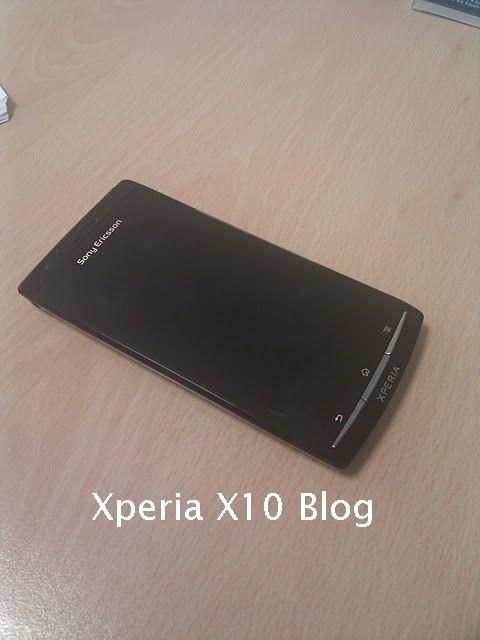
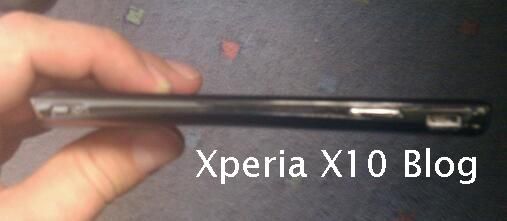
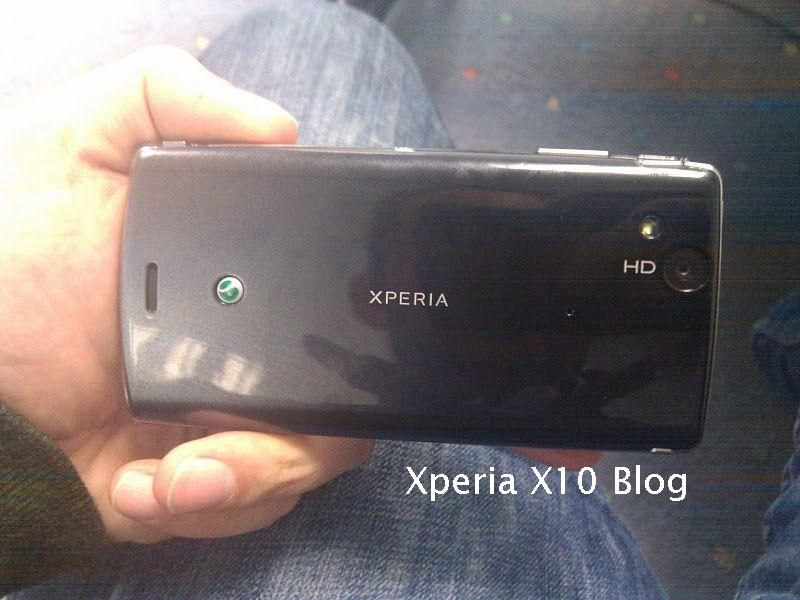
Our tipster has come back to us with some more details surrounding Sony Ericsson’s next Android flagship, codenamed ‘ANZU’. The phone is an early prototype currently running Android 2.1, but will use Android Gingerbread on retail launch. Even in its current state the phone is said to be very fast (no idea of CPU or RAM for now) but it will record at 1080 resolution and come equipped with a front-facing camera and HDMI port.
As you can see from the pictures below, the handset is very slim (thinner than the Galaxy S) and feels “very solid” in the hand. The display was also given particular credit with “very crisp” and “vivid colours”. There’s no idea what kind of display it is using, but let’s at least hope SE has implemented multi-touch this time.
Interestingly, our tipster goes on to say that the phone may be branded as a BRAVIA phone instead of XPERIA, which would certainly be a departure. Current Xperia X10 owners will be glad to hear that the loudspeaker and in-ear performance of the ANZU is much clearer/louder than the X10.
Sony Ericsson ANZU

Sony Ericsson ANZU

Sony Ericsson ANZU

Wednesday, November 3, 2010

LEAKED: Get BlackBerry 6 for your BlackBerry Bold 9700 Now!!


Bold 9700 OS 6.0.0.344

Well folks, the day has finally arrived. We are VERY excited to bring you OS6 for your Bold 9700! It seems after previously only seeing OS6 leaks for devices with 512mb device memory we finally have broken through to 256mb devices! With that being said, does this mean we will see OS6 developed for other 256mb devices? I sure hope so! Anyway, I haven't loaded this myself yet so there's no telling how it will actually run. Good luck and be sure to let us know how it runs!

Rapidshare
Megaupload
Deposit Files
Hotfile
ZShare
Fileserve
Depositfiles
Mediafire
Megashare
Rapidshare
Megaupload
Hotfile
BerryFX


*OS Disclaimer - Please Read: Keep in mind this is NOT  an official release and as such is not supported by RIM or your Carrier. If you choose to install, do so at your own risk and only if you're comfortable in the process of upgrading and downgrading your device software. Driphter.com is not responsible for any loss of data or other issues that may arise during the loading process. Please do not forget to back up your data prior to loading!

Source: driphter.com  willyboy6
 

Sample text

Sample Text

Sample Text

 
Blogger Templates